
90 days of the full version — no card required
PS Mobile Manager: your PrestaShop store in your pocket
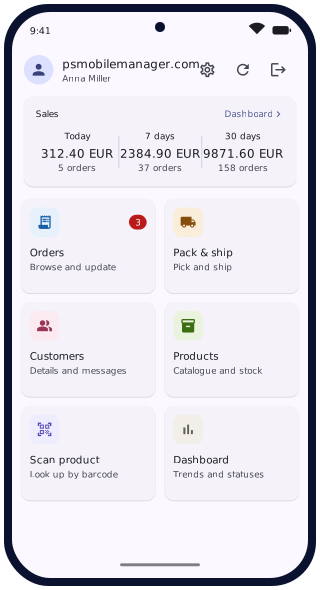
A module for PrestaShop 8+ together with a free phone app. Handle orders, keep an eye on sales, scan products and pack shipments. You can do all of this from your smartphone.
No intermediary cloud: the phone connects directly to your store.
PrestaShop 8+ · Android app · iOS in preparation
PrestaShop 8+
without overriding system files
No intermediaries
Your smartphone communicates directly with your store
Customise staff permissions
You decide who has access to orders, products or customer data
90 days of the full version
then preview mode. You decide whether you need the full version
What you get
Nine areas of a seller’s work, available in the app as soon as it is paired.
Orders
Detailed order information, the ability to change order status, edit the tracking number and correct the address — all from your phone.
Sales statistics
Revenue, number of orders and average basket value for a selected period, with a chart and a comparison with the previous period.
Products and stock
Product page preview, stock level and price adjustments, status changes, editing of descriptions and features.
Barcode scanner
Your phone’s camera as a barcode scanner, with which you can pick an order or look up product information.
Pack and ship
Once a customer has made a purchase, the order can be sent straight to picking. You then scan each product and the waybill number. There is no room for mistakes.
Photos from your phone
Take a photo of a product and upload it straight to the product page in your store. You set the order of the images and the main image in the app.
Order notifications
Receive instant notifications about orders. We will guide you through a simple process of activating push notifications on Google’s side. This is necessary so that instant notifications go directly from your server to your phone. All with the security of your store in mind.
Customers
Here you will find your customers’ contact details.
Administrator panel
Manage paired devices, grant permissions, browse logs. You are in control of everything.
Up and running in minutes
Three steps to working from your phone
1. Install the module
A standard ZIP package installation in the PrestaShop back office. The module does not override system files and does not require server access.
2. Pair your phone
Generate a QR code in the module and then scan it in the phone app.
3. Assign permissions and set up notifications
Assign the device to a group or set exceptions. Set up instant push notifications.
Security
Your store’s back office on a phone is a serious decision. We take it seriously.
- No intermediaries. Communication takes place only between your store and the app. Your customers’ data does not pass through any other servers.
- HTTPS enforced. An unencrypted request is rejected by the module.
- Pairing with a one-time code. The QR code is valid for a short time only.
- Rate limits. Pairing and login attempts are limited, which prevents unauthorised pairing.
- Staff permissions. A wide range of permission settings lets you tailor your staff members’ devices.
Version comparison
One licence per store. The smartphone app is free.
After installation you get 90 days of the Premium version free of charge, with no card required. After that, the module switches to the Lite version automatically.
| Feature | Lite | Premium | Bundle |
|---|---|---|---|
| Orders | |||
| Order list with search and status filter | ✓ | ✓ | ✓ |
| Marking of new and changed orders | ✓ | ✓ | ✓ |
| Automatic data refresh | — | ✓ | ✓ |
| Order details: customer, payment, addresses, items, status history | — | ✓ | ✓ |
| Status change with an automatic e-mail to the customer | — | ✓ | ✓ |
| Manual editing/adding of the tracking number | — | ✓ | ✓ |
| Tracking number added automatically after scanning the label with the built-in scanner | — | ✓ | ✓ |
| Editing the delivery address | — | ✓ | ✓ |
| Message to the customer in the order thread | — | ✓ | ✓ |
| Pack and ship | |||
| Queue of orders to pack | — | ✓ | ✓ |
| Picking with the scanner and a completeness check | — | ✓ | ✓ |
| Tracking number added automatically after scanning the label with the built-in scanner | — | ✓ | ✓ |
| Products | |||
| Product list with search | ✓ | ✓ | ✓ |
| Viewing and editing the product page (images, price, stock, codes, descriptions, specifications…) | — | ✓ | ✓ |
| Scanner for EAN, UPC and reference codes | — | ✓ | ✓ |
| Changing stock levels, including combinations | — | ✓ | ✓ |
| Enabling and disabling products, product visibility | — | ✓ | ✓ |
| Adding images from the camera or gallery | — | ✓ | ✓ |
| Customers | |||
| Customer list with search | ✓ | ✓ | ✓ |
| Customer page: orders, amount spent, addresses, consents, note | — | ✓ | ✓ |
| Editing account details and addresses | — | ✓ | ✓ |
| Sending messages to the customer | — | ✓ | ✓ |
| Sales | |||
| Sales statistics | — | ✓ | ✓ |
| Sales chart for up to 90 days, orders by status | — | ✓ | ✓ |
| Notifications | |||
| Instant notifications of new orders and status changes (setup required) | — | ✓ | ✓ |
| Automatic notifications after the store is checked about every 15 minutes (no setup required) | — | ✓ | ✓ |
| Account and settings | |||
| Pairing the phone with a QR code | ✓ | ✓ | ✓ |
| Permissions for each device and group | ✓ | ✓ | ✓ |
| App language, light and dark theme | ✓ | ✓ | ✓ |
| Diagnostic mode for support | ✓ | ✓ | ✓ |
Pricing
| Payment method processed by the international Stripe platform | Lite | Premium | Bundle |
|---|---|---|---|
| Annual subscription (automatic renewal — requires a linked card) | — | PLN 105 / year (PLN 8.75 / month) | coming soon |
| Monthly subscription (automatic renewal — requires a linked card) | — | PLN 13 / month | coming soon |
| One-time payment for 12 months | — | PLN 130 | coming soon |
| One-time payment for 1 month | — | PLN 17 | coming soon |
You buy the licence in the module panel, in your own store — after installation, the module shows the prices and takes you to a secure payment.
The prices above do not include VAT. A VAT invoice is sent for every order. A licence covers one store (one domain). A subscription renews automatically. A one-time purchase does not renew. You cancel a subscription yourself in the Stripe customer portal. Details: terms of sale and licence terms.
Activation code
Prefer to buy a licence outside the module panel? You can also buy a licence as an activation code.
- Buy a code in one of the shops below.
- Install the module in your PrestaShop store.
- Enter the code in the module configuration, in the “License” section. The licence runs from the day of activation.
One code unlocks one store. The price and the invoice are provided by the seller in their offer.
Requirements
Will it work for me?
Store
PrestaShop 8+, PHP 8.1 or later, store accessible over HTTPS with a valid certificate.
Phone
Android 8.0 or later. A camera is required for pairing and scanning codes. iOS version in preparation.
Permissions in the store
Access to the back office with permission to install modules.
FAQ
Do I have to pay for the phone app?
No. The app is free. You can install it on any number of phones. What you pay for is the module installed in your store.
How many phones can I connect to one licence?
As many as you like within one store. Each device has its own permissions. Adding another staff member is free of charge.
Does my data end up on your servers?
No. Orders, products and customer data remain in your store, and the phone retrieves them directly from it. Our server only checks the status of the store’s licence.
What happens when the trial period or the licence ends?
The app switches to the Lite version. Buying a licence restores full access without having to configure anything again.
Try it on your own store
Installation takes a few minutes, and the first 90 days are the full version with no card required.
Feel free to write to us in your native language. You will receive a reply in the same language. · Polish version